

How to Withdraw PF Online: The Employees’ Provident Fund (EPF) is a crucial savings scheme for salaried employees in India, offering financial security for retirement. With digital advancements, withdrawing your PF online has become quick and hassle-free—no need to visit the EPFO office or depend on your employer.
This comprehensive guide explains how to withdraw your PF online, eligibility criteria, required documents, and common issues faced during the process. Whether you’re changing jobs, retiring, or facing a financial emergency, this guide will help you claim your PF smoothly.
Who Can Withdraw PF Online?
Before initiating a withdrawal, check if you meet the EPFO eligibility criteria:
✅ Full PF Withdrawal:
-
Retired employees (aged 58+).
-
Unemployed for 2 months or more.
-
Employees switching to a foreign job (with valid visa).
✅ Partial PF Withdrawal:
-
Medical emergencies (self/family).
-
Home loan repayment or purchase.
-
Marriage/education of children.
-
After 5 years of continuous service (for specific needs).
❌ Not Eligible for Withdrawal:
-
If still employed (unless under special conditions).
-
If UAN (Universal Account Number) is not activated or linked with KYC.
Documents Required for PF Withdrawal
Before applying online, ensure you have:
-
Active UAN (Linked with Aadhaar & PAN).
-
Bank Account Details (IFSC code & account number linked with UAN).
-
Aadhaar Card (Biometric verification needed).
-
PAN Card (Mandatory for withdrawals above ₹50,000).
-
Cancelled Cheque/Passbook (For bank verification).
Note: If withdrawing for medical reasons, you may need hospital bills.
Step-by-Step Process to Withdraw PF Online
Step 1: Activate UAN & Complete KYC
-
Visit EPFO Member Portal.
-
Log in using your UAN & password (OTP-based login available).
-
Go to “KYC” section and link Aadhaar, PAN, and Bank Details.
-
Wait for employer approval (usually takes 2-3 days).
Step 2: Submit PF Withdrawal Claim
-
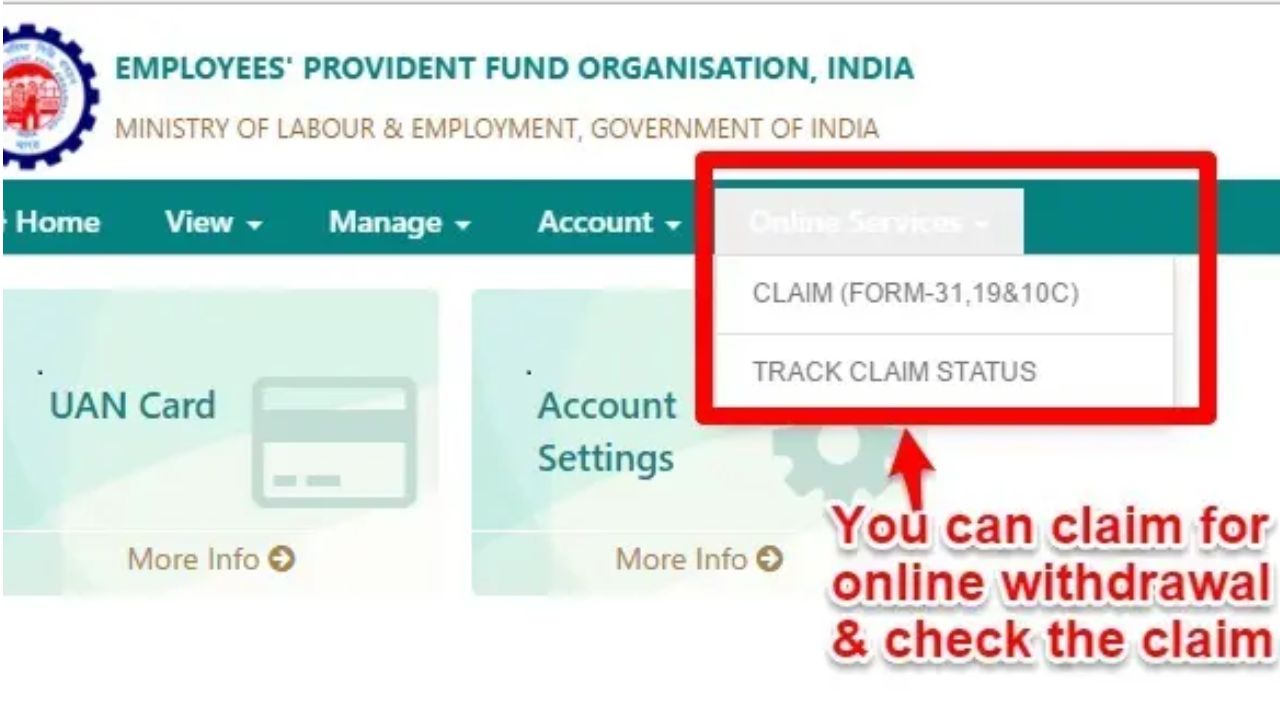
Go to “Online Services” → “Claim (Form-31, 19 & 10C)”.
-
Select “Proceed for Online Claim”.
-
Choose withdrawal type:
-
Full Settlement (Form 19) – For final PF withdrawal.
-
Partial Withdrawal (Form 31) – For emergencies.
-
Pension Withdrawal (Form 10C) – If eligible for EPS.
-
-
Enter amount required and reason for withdrawal.
-
Upload cancelled cheque/passbook if required.
-
Submit the claim.
Step 3: Employer Approval & EPFO Verification
-
Your employer must approve the request (if still employed).
-
EPFO verifies details and processes payment within 10-15 days.
Step 4: Check PF Withdrawal Status
-
Track your claim at “Track Claim Status” on the EPFO portal.
-
Once approved, the amount is credited directly to your bank account.
Common Issues & Solutions
❌ Problem: UAN not activated.
✅ Solution: Register on the EPFO portal and verify mobile/email.
❌ Problem: Aadhaar not linked.
✅ Solution: Update KYC via employer or EPFO portal.
❌ Problem: Claim rejected due to incorrect details.
✅ Solution: Reapply with correct bank/PAN details.
❌ Problem: Employer not approving withdrawal.
✅ Solution: Contact EPFO Grievance Cell at epfigms.gov.in.
Tax Implications on PF Withdrawal
-
Before 5 Years:
-
Taxable if withdrawn before 5 years of continuous service.
-
TDS @ 10% (if PAN linked) or 30% (if PAN not linked).
-
-
After 5 Years:
-
Tax-free (no TDS deduction).
-
Tip: Use Form 15G/15H (if income below taxable limit) to avoid TDS.
Alternate Methods to Withdraw PF
If online withdrawal fails, try:
-
Offline Withdrawal: Submit physical Form 19/31 to EPFO office.
-
UMANG App: Withdraw via the EPFO section in the UMANG app.
-
SMS Service: Send “EPFOWO UAN ENG” to 7738299899 (for English).
Conclusion
Withdrawing your PF online is now simple, fast, and paperless if your UAN and KYC are updated. Follow the steps carefully, ensure employer approval (if needed), and track your claim status regularly.
Pro Tip: Avoid unnecessary withdrawals—your PF is a long-term savings tool for financial security!
Got questions? Drop them in the comments, and we’ll help you out!
Latest News
- New Honda City Facelift 2026 Launched – Sporty Coupe Look And ADAS Safety Revealed

- 8th Pay Commission: केंद्रीय कर्मचारियों की बढ़ेगी बंपर सैलरी! आयोग ने उठाया यह बड़ा कदम

- China: चीन के कोयला खदान में भयंकर विस्फोट, 90 लोगों की गई जान, पीएम मोदी ने भी जताया दुख

- Weather warning – Heavy Rain, thunderstorms, lightning Alerts for 13 States Over Next 3 Days

- UP TGT Exam City Slip 2026 Released – Download at upessc.up.gov.in, Exam June 3-4

- ATM Alert: एटीएम में फंस जाए डेबिट कार्ड तो घबराएं नहीं, फटाफट यह काम करने से होगा समाधान

- Post Office Scheme – 7.5% Interest Rate, ₹5 Lakh Becomes ₹7,24,974 in 5 Years, Start with Just ₹1,000

- Best AI Video Editing Laptops Under 60,000 INR: Top Picks Her

- Best CNG Cars: पेट्रोल के बढ़ते दाम के बीच ये सीएनजी गाड़ी खरीदकर खर्च करें कम, माइलेज भी जबरदस्त

- Samsung Stable One UI 8.5 Update to Galaxy Tab S10 FE and Tab S10 FE+
