

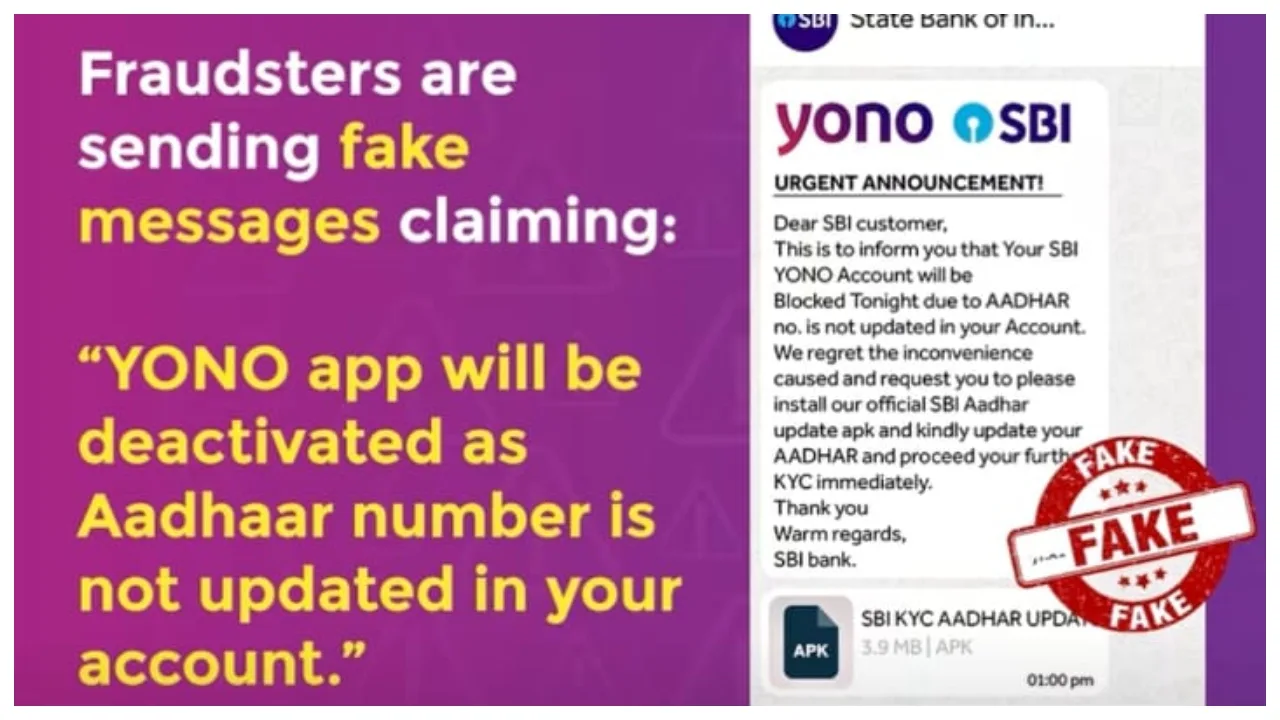
SBI Alert:- Are you also a customer of the State Bank of India (SBI)? If so, there is significant news emerging for you. A message related to the State Bank of India is currently going viral rapidly across social media platforms. It claims that if you do not update your Aadhaar details immediately, your YONO app will be deactivated. This raises the question: has the government truly issued such an order? Or is there absolutely no truth to this news? Upon seeing this message, many people may panic, fearing that their YONO app will stop working if they do not update their Aadhaar details right away.
What is the truth behind this news?
This viral message often includes a link to an APK file and claims that installing it promptly will update your Aadhaar details. Fear is being instilled in customers, making them believe they will be unable to access their bank accounts via the app. The Press Information Bureau (PIB) conducted a ‘fact-check’ regarding this matter. The PIB has clarified that there is absolutely no truth to this viral news, and no such order has been issued by SBI.
Sharing a post on the social media platform Instagram, the State Bank of India stated: “Scammers are sending fake messages claiming your YONO app will be deactivated as your Aadhaar number is not updated in your account. ❌ Don’t fall for it.”
“👉 Do not download apps from unknown links or APK files shared through unsolicited emails, SMS, or WhatsApp.”
In reality, this is a calculated scheme orchestrated by cybercriminals to steal people’s personal information through intimidation. According to the bank’s regulations, they will never ask you for confidential information such as your Aadhaar number, banking passwords, or OTPs. If anyone requests such details from you, you should assume they are a fraudster.
View this post on Instagram
Officials advise customers to steer clear of such messages and emphasise that there is absolutely no need to panic, as they are entirely fraudulent. These files sent by cyber thieves can not only steal your phone’s data but also drain your bank account.
Keep the following points in mind:
Do not download or install apps from any source other than the Google Play Store.
Do not install any app simply because someone suggests it.
Always keep the “Unknown Sources” option disabled in your phone’s settings.
Use only the official banking app.
Latest News
- Weather warning – Heavy Rain, thunderstorms, lightning Alerts for 13 States Over Next 3 Days

- UP TGT Exam City Slip 2026 Released – Download at upessc.up.gov.in, Exam June 3-4

- ATM Alert: एटीएम में फंस जाए डेबिट कार्ड तो घबराएं नहीं, फटाफट यह काम करने से होगा समाधान

- Post Office Scheme – 7.5% Interest Rate, ₹5 Lakh Becomes ₹7,24,974 in 5 Years, Start with Just ₹1,000

- Best AI Video Editing Laptops Under 60,000 INR: Top Picks Her

- Best CNG Cars: पेट्रोल के बढ़ते दाम के बीच ये सीएनजी गाड़ी खरीदकर खर्च करें कम, माइलेज भी जबरदस्त

- Samsung Stable One UI 8.5 Update to Galaxy Tab S10 FE and Tab S10 FE+

- बुढ़ापे की लाठी बनेंगी ये तीन स्कीम्स, निवेश से पहले जानिए कितना मिल रहा ब्याज

- OnePlus Nord CE 6 vs Samsung Galaxy A57: Which Mid-Range 5G Phone Wins?

- Lenovo LOQ 15 Gen 11 Review: Best Budget Gaming Laptop?

