


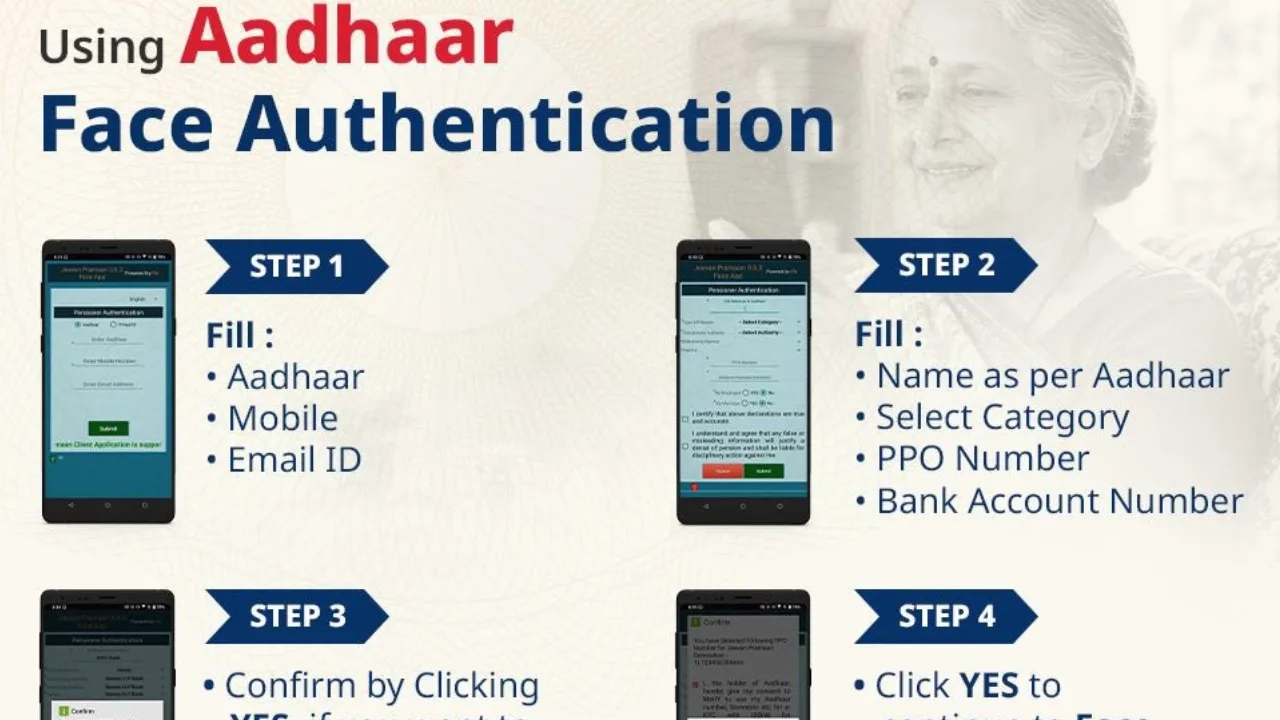
The Jeevan Pramaan certificate is an important document for pensioners as it serves as proof that they are alive and eligible to continue receiving their pension. Traditionally, pensioners had to visit their respective banks or pension offices to submit a life certificate every year. However, with Aadhaar Face Authentication, the entire process can be completed using a compatible smartphone and the required mobile application.
How to Generate Jeevan Pramaan Using Aadhaar Face Authentication?
Pensioners can follow these six simple steps to generate their Digital Life Certificate through Aadhaar Face Authentication.
Step 1: Enter Your Aadhaar and Personal Details
First, open the Jeevan Pramaan application on your smartphone. Enter the required details, including your Aadhaar number, registered mobile number and email ID. Make sure that the information provided is accurate before proceeding to the next step.
Step 2: Fill in Pension-Related Information
After submitting the initial details, provide your name exactly as mentioned on your Aadhaar card. Select the appropriate pension category and enter your Pension Payment Order (PPO) number along with your bank account number. Carefully check all the information to avoid errors during the verification process.
Step 3: Confirm Your Pension Details
Once the required information has been entered, the application will ask you to confirm whether you want to add another pension. If you wish to include any additional pension details, click on YES. Otherwise, select NO to proceed with the application.
Step 4: Give Permission for Face Authentication
The next step involves Aadhaar-based Face Authentication. A confirmation message will appear on your smartphone screen. Click on YES to continue with the face authentication process.
Step 5: Complete Aadhaar Face Authentication
Now, position your smartphone camera at the appropriate distance from your face. Make sure that your face is clearly visible and properly aligned within the camera frame. Keep your face steady and blink your eyes when prompted by the application. The system will capture your facial details and verify your identity through Aadhaar-based authentication.
Step 6: Download Your Jeevan Pramaan Certificate
After successful face authentication, your Jeevan Pramaan certificate will be generated digitally. You will receive an SMS on your registered mobile number containing your Pramaan ID and a link to download the Digital Life Certificate. You can use this ID to access your certificate whenever required.
Why Is Aadhaar Face Authentication Useful for Pensioners?
Aadhaar Face Authentication offers significant convenience to pensioners, particularly senior citizens and those who have difficulty visiting banks or government offices. The digital facility reduces paperwork and eliminates the need for physical visits to submit a life certificate, provided the pensioner has access to a compatible smartphone and the required applications.
The process also makes identity verification easier through facial recognition, helping pensioners complete the annual life certificate submission from the comfort of their homes. With this facility, pensioners can save time, avoid unnecessary travel and complete an important pension-related requirement through a simple digital process.
Here are few simple steps to generate DLC using Aadhaar Face Authentication.
Easy, convenient and hassle free.
Adopt the Convenience, Enjoy the Comfort!
#DigitalLifeCertificate #JeevanPramaan #AadhaarFaceAuthentication #DLC #Pensioners #EaseOfLiving #UIDAI https://t.co/qeDFXecyF3
“>November 11, 2026
Aadhaar Face Authentication is an important step towards making pension services more accessible, convenient and technology-driven for senior citizens across the country.