


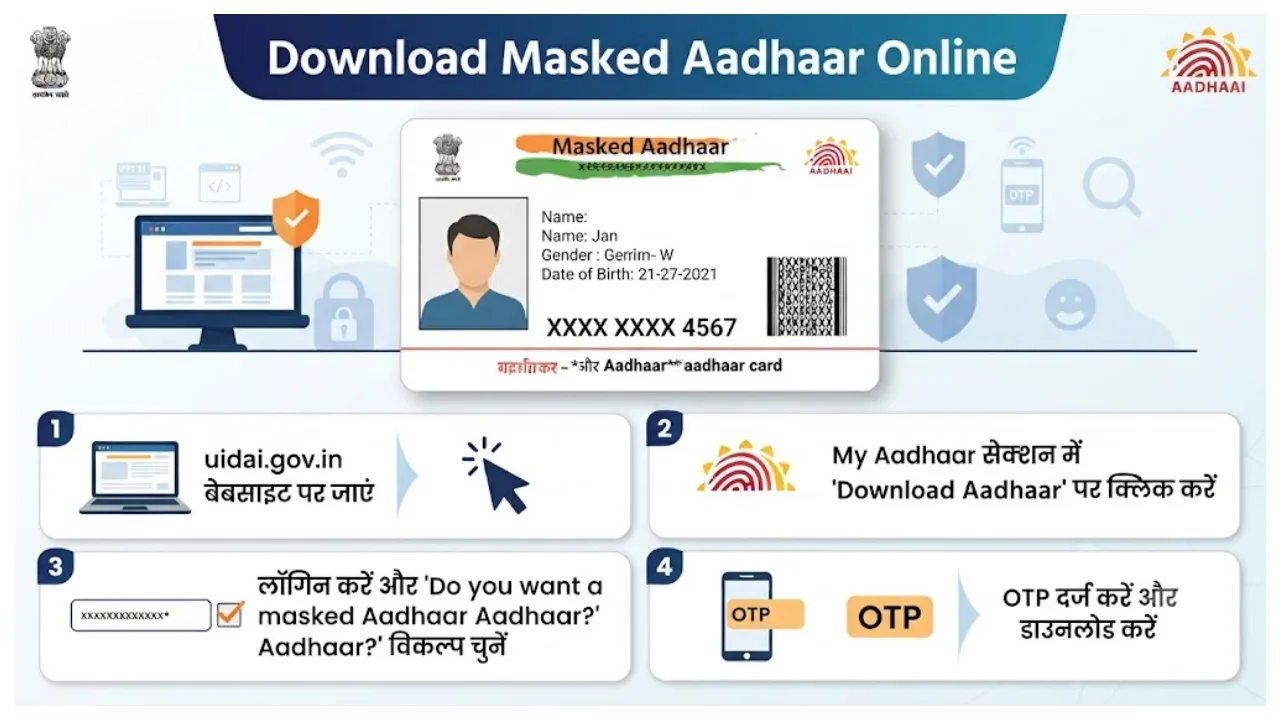
Masked Aadhaar: At present, the Aadhaar card has become the most important document. Now it is used in every government and non-government office. An Aadhaar card is required to open a bank account, avail government schemes and many other purposes. But many times, a copy of the Aadhaar card has to be submitted at a different place. In such a situation, it is also necessary to take care of the security of the Aadhaar number.
To address this issue, UIDAI provides the option to download a masked Aadhaar. When you use Masked Aadhaar, it does not reveal the full digits of your Aadhaar number while you share information related to your identity. You can download it online on your mobile device. Please let us know in detail about the masked Aadhaar. What are its benefits along with this option?

What is a masked Aadhar card?
A masked Aadhaar card is just like an ordinary Aadhaar. In this case, 8 numbers of your Aadhar card are hidden, and only the last 4 numbers are visible. Only 4 numbers are visible. Its biggest advantage is that you do not need to share your entire Aadhaar number everywhere. This prevents misuse of the Aadhaar number. There is no unnecessary risk of any kind.
Masked Aadhaar displays only the last four digits of your Aadhaar Number — making it a convenient option when required. May choose Masked Aadhaar, wherever applicable.
Download it using myAadhaar Portal or Aadhaar App.
#Aadhaar #UIDAI #MaskedAadhaar #AadhaarApp #myAadhaarPortal #StayAlert
“>October 25, 2026
How to download masked Aadhaar?
First of all, you have to visit the official website of UIDAI.
Next, select the login option on the website.
After completing these steps, 12 Aadhar numbers and the CAPTCHA code of the Aadhar card will be visible.
Now OTP will come to your Aadhaar-registered mobile number; enter it and complete the login process.
After logging in, select the option of downloading the Aadhar card in the given service and follow the further instructions.
Before downloading, the option of masked Aadhaar will be visible. You have to tick it. 8 numbers will be hidden in it.
Now the download option will be available.
Your masked Aadhaar PDF file will be saved in the device. A password is required to open it.